Platform / Governance
Every change has a name on it.
Before you let anyone change your live site, you want three things: a record of what happened, control over who is allowed to do it, and a way to stop it. More than 90 kinds of action are written down, from a sign-in to a billing change, with the person who did it, the address they worked from, and the values before and after.
The audit trail and the sign-in protection are on from your first day, on the free plan. They are not an upgrade you buy later.
Start free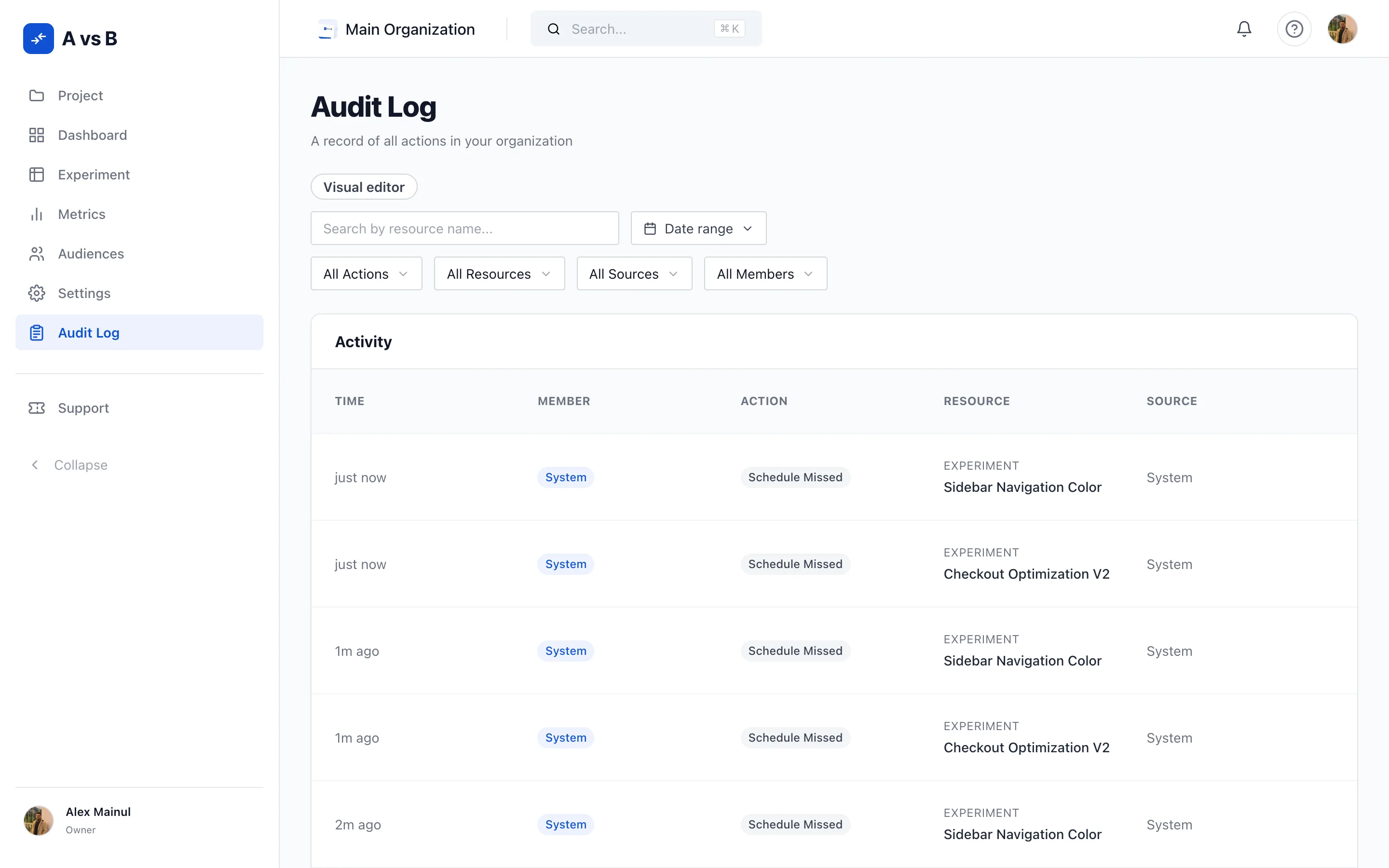
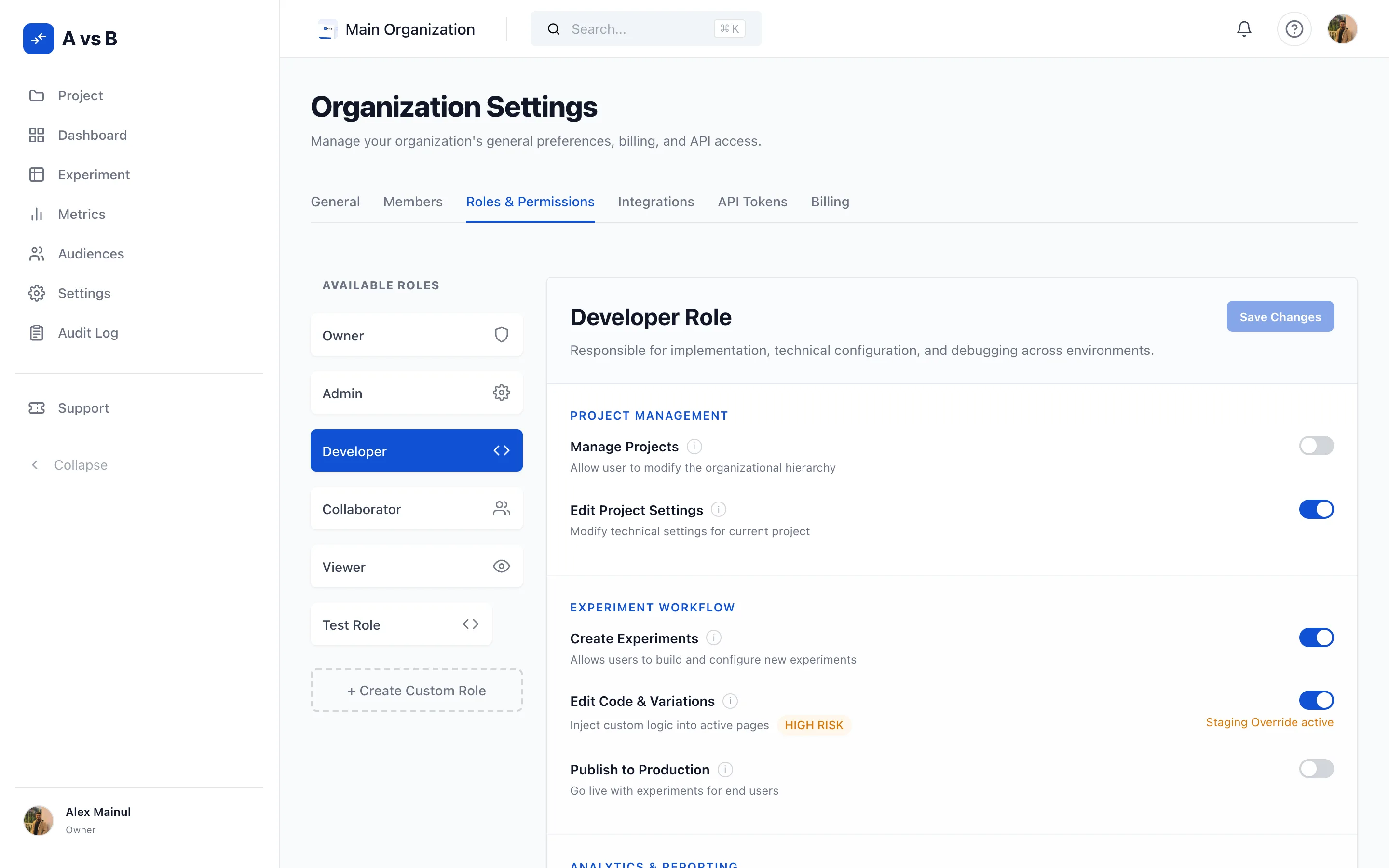
Decide exactly who can do what.
Every organization starts with 5 roles already built, so you can invite a colleague without designing a permission model first.
- Owner
- Full control of the workspace, with every permission on.
- Admin
- Full access to billing, project settings, and the team.
- Developer
- Implementation, technical configuration, and debugging across environments.
- Collaborator
- Can launch and pause existing experiments, and read reports.
- Viewer
- Read-only access to every report and experiment setup.
If none of those fit, build your own. A custom role is built from 10 named permissions, switched on one at a time, and you can keep up to 10 of them per organization. Custom roles are included on every plan, Free too.
One split matters more than it looks. Publishing to production is its own permission, separate from creating an experiment. Someone can build all day without being able to put anything in front of a customer.

The audit log has the answer.
Over 90 kinds of action are recorded. Signing in, changing a role, publishing a variation, stopping an experiment, rotating a secret, changing the plan you pay for.
Every entry carries
- Who did it, by name and email address
- The network address they worked from
- What the value was before, and what it is now
- Whether it succeeded, and why it did not
It also records where the action came from: the dashboard, the API, the command line, and the platform itself. A change made by a script through the API is just as visible as one made by a person clicking a button.
Failed attempts are kept too, with the reason each one failed. You see what someone tried to do, not only what worked.
Two-factor for people, scoped tokens for machines.
For people
Two-factor sign-in by emailed code. Switch it on and every sign-in from then on needs your password plus a 6 digit code sent to your email address. This is an emailed code, not an authenticator app.
The code expires 10 minutes after it is issued, and it is stored scrambled, so nobody at our end can read it back to you. After 3 wrong answers the code stops working and you have to request a new one. Requests are rate limited, so nobody can sit there guessing.
Turning it on, and every failed attempt, is recorded. Those entries belong to your account rather than to any one organization, so they sit outside an organization’s own log.
For machines
Access tokens, scoped resource by resource. You grant a token read or write on each part of the platform separately, so the script that reads results cannot quietly change an experiment.
Give a token an expiry of up to a year, or none at all. Rotate it and the old secret stops working, while the record of what it did stays. Revoke it and it is gone. Every token shows when it was last used and from where, so a token nobody can account for is easy to spot.
A token is stored scrambled and shown to you once, when you create it. If you lose it, rotate it. Nobody can look it up for you.
Read the authentication reference
Decide the rules before you see the numbers.
An experiment’s analysis plan is written before it starts and seals the moment the first visitor arrives. From then on it is read-only, so the bar you set in advance is the bar the result is judged against. The goalposts cannot move once you have seen the numbers.
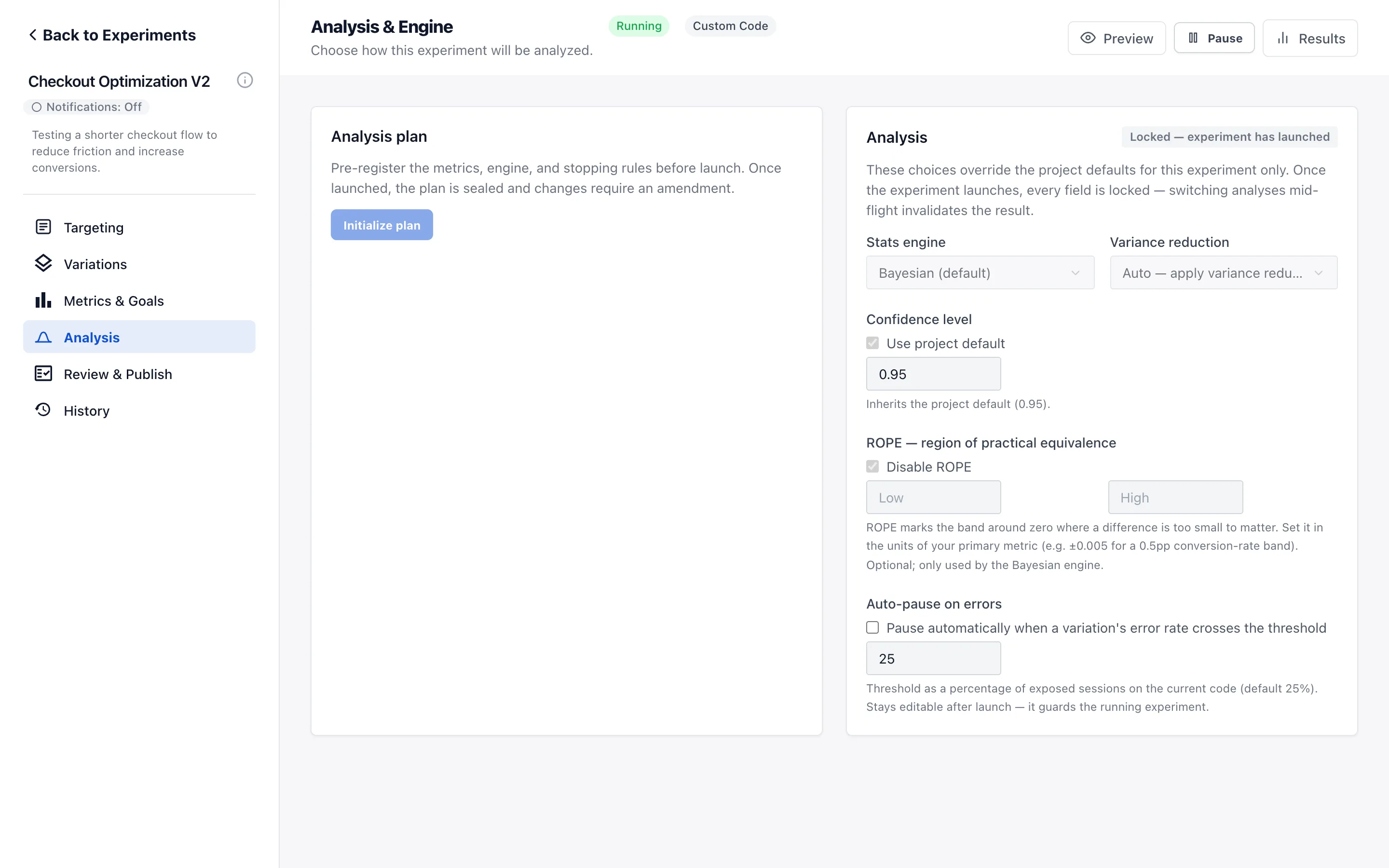
When the plan has to change
Sometimes it genuinely does. Amendments are allowed, and each one is recorded field by field. 6 things go on the record every time.
- Which field changed
- What it was before
- What it is now
- Who changed it
- When
- Why
The reason is not optional. A plan cannot be amended without one.
When someone wants to call it early
Stopping a fixed-sample test the moment it looks good is one of the easiest ways to get a wrong answer. Three guards sit in the way.
- You see how far through the test you areA banner on the results page says how far through the planned sample the test really is, before you read anything into the numbers.
- Stopping early takes a deliberate confirmationStopping early raises a confirmation you have to answer. It is not a warning you can scroll past.
- Your override goes on the recordYou are always allowed to overrule it. The fact that you did, when, and who you are, is written down permanently.
Checking a result over and over raises the odds of a false alarm, so the results page tells you roughly by how much, based on how many times you have actually looked. How we work that out
A broken experiment stops itself.
The risky part of testing on a live site is the hour between something going wrong and somebody noticing. So the platform watches for you and pulls the brake itself.
It pauses on errors, by default
If a variation starts throwing errors at more than 25 percent of the people who see it, the experiment pauses itself. It is on from the moment the experiment is created, and the threshold is yours to move.
It tells you what broke
Each experiment keeps its own error log: script errors, changes that failed to apply, and elements that were not on the page. Rates appear once at least 50 visitors have seen the variation, because a percentage taken from a handful of people is noise, not a measurement.
Guardrails that can actually fail
Name the numbers that must not get worse, and each one gets a real test with three honest outcomes: Safe, Breached, and Inconclusive. They are tested, not just watched, so a guardrail can come back and say no.
An alarm on the traffic split
If the split between your variations drifts from what you asked for, the result is suspect however good it looks. So it is checked and flagged. The check runs from the last time you changed the split, not over all time, so yesterday’s mistake still shows.

And when you stop an experiment, stopping is permanent. The variation code leaves your site straight away, with no half-stopped state where a change is still reaching some visitors. Your results are kept, so you lose nothing but the risk.
Alerts land where your team already works.
Webhooks on about 25 product events, from an experiment launching to a guardrail failing. Every attempt is kept with the response it got, you can retry a delivery by hand, and you can rotate the signing secret in place. A destination that keeps failing is switched off automatically instead of hammering a dead endpoint.
Or skip the plumbing. Route alerts straight into Slack, Microsoft Teams, and Jira. Choose per project which events go where, and set keywords so a channel only hears about the work it cares about. That way people keep reading the alerts instead of muting the channel.
And everything the dashboard does, the API does. Experiments, flags, metrics, audiences, segments, members, roles and webhooks are all reachable, with 24 pages of reference documentation behind them. So you can automate the governance work instead of clicking through it.
Read the developer referenceWhen the problem is ours, you hear it from us.
There is a public status page, checked from outside our own network, so a problem cannot hide behind the thing that is broken. Anyone can read it, account or no account.
Put every change on the record.
Free for your first 10,000 visitors a month, with the audit trail, two-factor sign-in and custom roles included.